Mobile applications
Turn your idea or service into an experience your audience can use on mobile.
Explore Mobile applicationsMo Soft / Software solutions
We develop mobile, web and desktop software. Discover Mo Soft’s services and our work in software development.
Mobile. Web. Desktop.

What we offer
Software for entrepreneurs and business owners. You receive the software and its source code, within the agreed scope.
Turn your idea or service into an experience your audience can use on mobile.
Explore Mobile applicationsA website that introduces your business, or an application that delivers your service in the browser.
Explore Websites and web applicationsCustom desktop software with features that fit the way you work.
Explore Desktop softwareFrom idea to delivery and beyond
We work with you at every step. You take part in decisions and review each completed feature, through delivery and ongoing follow-up and maintenance.
We listen to your idea and analyse your project’s needs to understand its purpose and how it will be used.
Your part in this step
Share your idea, its goals and the needs of your business.
We choose suitable technology, define the scope, timeline and cost, and agree on them with you before starting.
Your part in this step
Review and agree on the plan, scope, timeline and cost with us.
We prepare the design, discuss your feedback and make revisions. Development starts after you approve the design.
Your part in this step
Review the design, share your feedback and approve it before development.
As each feature is completed, we show it to you and discuss it together so you can follow progress during development.
Your part in this step
Review each feature with us and share your thoughts and feedback.
We test the software with you and work through revisions. You receive the software, source code and usage guidance, with deployment to hosting and app stores as appropriate for your project’s platforms.
Your part in this step
Try the software, share your feedback and review the handover with us.
We follow up after launch, address issues that arise and discuss maintenance and update needs.
Your part in this step
Tell us about any issues during use or new needs for your project.
The follow-up period and the scope of maintenance and revisions are defined in our agreement with you.
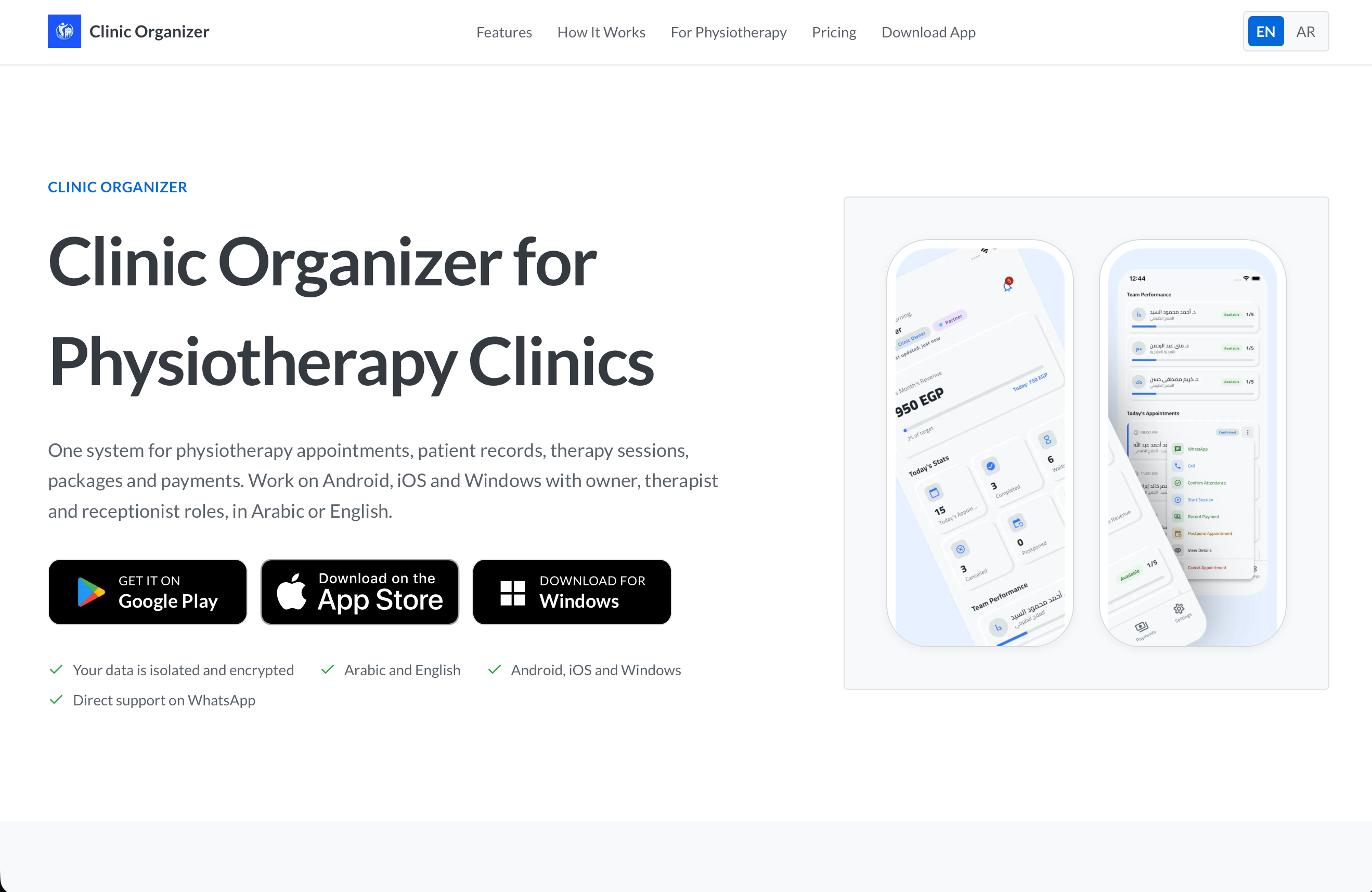
We developed Clinic Organizer as a physiotherapy clinic management system, bringing appointments, patient records, sessions, packages and payments into one experience in Arabic and English. The project includes Android and iOS apps, a Windows desktop version, and a product website with platform download links. Scheduling includes available time slots based on clinic working hours, prevention of duplicate bookings, attendance confirmation, and appointment postponements with a history of changes. We built patient records around complaints, medical history, assessments and treatment plans, with an interactive body map for locating injuries. Appointments connect to the session workflow through a live timer, clinical notes, pain scores and an appointment status update when the session ends. The financial workflow covers session and package payments through different payment methods, outstanding balances, and revenue and therapist performance summaries and reports. This connects appointment booking and treatment documentation to payment collection and clinic performance review. We also accounted for different team responsibilities through owner, therapist and receptionist permissions. Owners oversee the clinic, team and reports; therapists work with their patients and sessions; receptionists manage bookings and payments without editing clinical records. The work brought these connected workflows into one system, with interfaces prepared for both languages and for mobile and desktop platforms.
Project details

A reading companion that helps users build consistent habits through timed reading sessions, daily and weekly goals, and visual progress tracking. Features include a heatmap calendar for reading streaks, milestone achievements, and statistics and charts that show reading patterns over time. Background reminders encourage users to maintain their routine. Built with Flutter and Firebase, using Cubit/Bloc and Clean Architecture. Syncfusion provides analytics charts, while Workmanager handles background reminders. Project status: Completed. Contribution: Solo project.
Project details

A tire measurement utility for car owners and mechanics. It converts tire size codes into clear dimensions with visual results and lets users compare two sizes side by side. A searchable database provides recommended sizes by car make and model. Data is stored locally as JSON so the app works without an internet connection, with Arabic and English language support. Built with Flutter, Bloc and Provider for state management, get_it for dependency injection, and Clean Architecture. Project status: Completed. Contribution: Solo project.
Project details

An equipment management system for the Saudi Arabian Embassy, covering asset registration, inventory and tracking. QR codes identify equipment, and camera scanning gives staff access to asset information. The app includes maintenance scheduling and reminders, a statistics dashboard, PDF report generation and printing, role-based access, and local data caching with Hive. Built with Flutter, Cubit/Bloc and Dio, with Firebase Cloud Messaging for notifications and pdf/printing for reports. The portfolio provides a Google Play listing and a system website. Project status: Completed. Contribution: Solo project.
Project details
Have a project in mind?
Discuss your projectThe company
At Mo Soft, we develop mobile apps, web applications and desktop software for entrepreneurs and business owners. We start by understanding your needs and agree on the software’s scope with you before development.
You review the design before development and see each feature as it is completed. At handover, you receive the software, source code and usage guidance, with follow-up and maintenance as agreed.
Before we begin
Find out how to get started, how development works and what you receive. We define each project’s details with you in the agreement.
Share your idea, its goals, who will use the software and the main features you need. We discuss the details and analyse your needs, then agree on the plan, scope, timeline and cost before starting.
After discussing the idea and analysing your needs, we define the scope, platforms and suitable technology. These inform the timeline and cost. You review the plan and agree on it with us before development.
You review the design, share your feedback and approve it before development. As each feature is completed, we show it to you and discuss it together so you can follow progress and share your thoughts.
You receive the software within the agreed scope, along with its source code and usage guidance. We test the software with you and work through revisions, with deployment to hosting and app stores according to your project’s platforms and our agreement.
Yes. We follow up after launch, address issues that arise and discuss maintenance and update needs. The follow-up period and the scope of maintenance and revisions are defined in our agreement with you.
Start a conversation
Tell us about your idea, who will use the software and what you need it to achieve. We’ll start there and discuss your project’s needs and next steps with you.